For community centres and halls
Community venue booking for the classes and clubs you run.
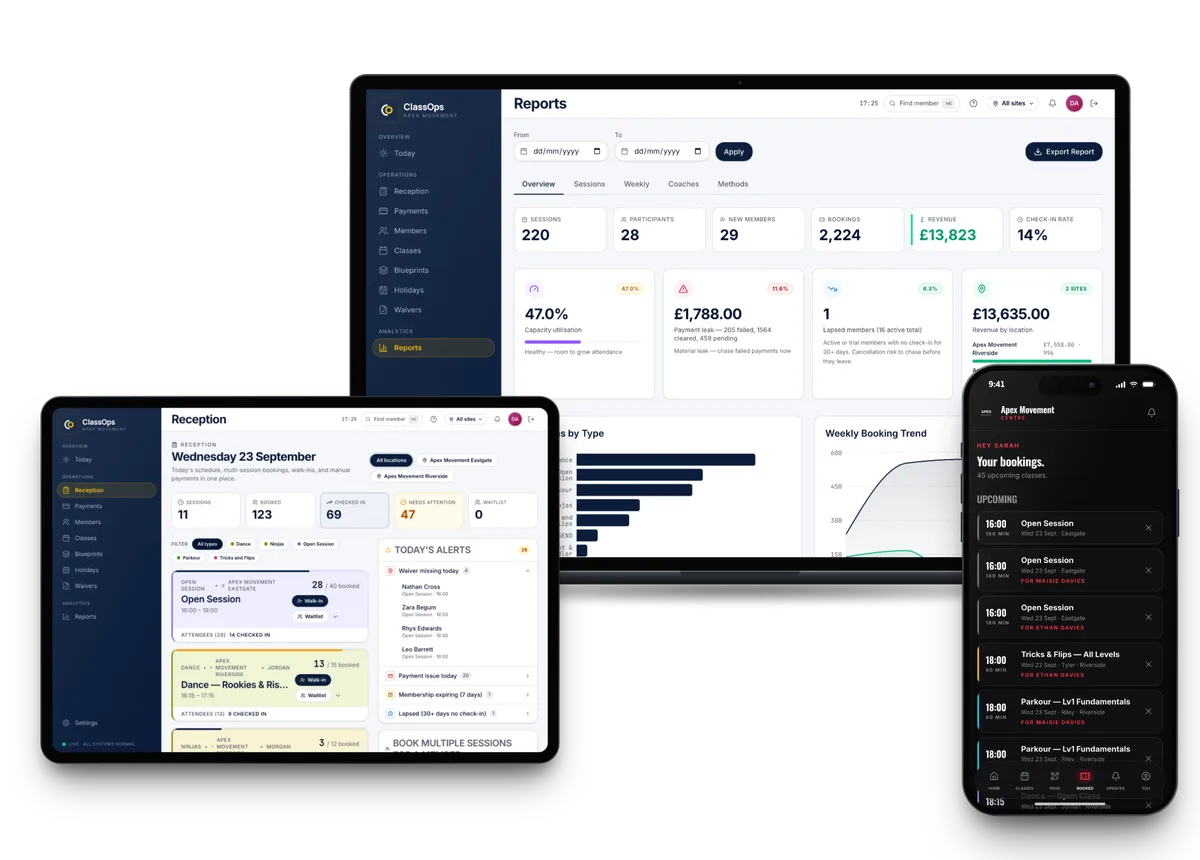
ClassOps books the classes, clubs and holiday camps a community venue runs itself. People book and pay in an app under your name, parents sign a waiver for each child, and your staff check people in from one screen.
Live at Nova City Centre since August 2026 · UK built and supported
Sound familiar?
Where the current setup lets you down
Every activity booked a different way
The toddler group takes cash, the youth club uses a form and the fitness class runs from a WhatsApp group.
Volunteers stuck with the admin
Whoever is on the door ends up checking lists and chasing forms instead of running the session.
No clear picture for the committee
When trustees ask which sessions are well used, the answer lives in several notebooks.
How ClassOps fits
Built around how community venues actually run
Example timetable
- 09:30Toddler Stay and PlayWaitlist open15 / 15
- 11:00Chair Based Exercise12 / 20
- 16:00Youth Club (11 to 14)22 / 30
- 18:30Beginners Fitness14 / 18
- 19:45Community Dance17 / 24
One app for every session
Classes, clubs and holiday camps book in one app carrying your venue's name, with card payments through Stripe.
Waivers before the first session
Waivers are signed in the app, one per child, and booking waits until they are. They export as PDF when insurance asks.
One desk screen
Staff and volunteers check people in, take walk ins and payments, and see alerts for missing waivers on one screen.
Logins that match the building
Each staff login is limited to its own venue, so a helper at one site only sees that site.
Session reports for trustees
Session level reports, day of week trends and revenue by site show which activities are used and which are quiet.
Cash and terminals count too
Payments taken in cash or on Square and Zettle terminals are recorded against the same person as their card payments.
Proof
Nova City Centre moved from Glofox. Live at two sites since 1 August 2026.
Nova City Centre runs kids classes, open sessions and memberships across two sites on ClassOps, with one desk screen, one waiver per child and revenue reported by site. The same setup suits a venue running a mix of its own activities.
Read the Nova City storySwitching
Nothing is switched off until you are happy
- 01Discovery callA free 45 minute call about how your gym runs today.
- 02Set upYour brand, sites, classes, prices and waiver wording configured for you.
- 03Bring members acrossCurrent members imported. Each one claims their account from an email to their own inbox.
- 04Run side by sideUp to 30 days alongside your old system, so nothing is switched off until you are happy.
- 05Switch overYou cancel the old system when you are ready. We stay on the end of the phone.
Questions
What community venues ask us
- Can people book the hall itself?
- ClassOps is built for booking the classes, clubs and camps you run, not for hiring out rooms by the hour. If room hire is a big part of your week, talk it through with us on the free call.
- Can we run lots of different activities?
- Yes. Each class or club is set up once as a blueprint with its own capacity, and holiday camps can be booked by the day or as a bundle.
- Can volunteers use it without seeing everything?
- Yes. Every helper gets their own login, limited to their own venue.
- What if some people pay in cash?
- Cash and Square or Zettle terminal payments can be recorded against the same person as their card payments in the app.
- Can we export our records?
- Yes. Members, bookings, payments and waivers export in full, free, at any time. GDPR export and erasure are built in.
See ClassOps set up for your venue.
A free 45 minute call with the team that builds it. You leave knowing what it costs and how the move works.